MaraPets will be 22 Years Old next month and both the internet (and the world!) have changed a lot since then.
As soon as we finished making MaraPets fully mobile friendly and revamping most of our oldest artwork, we began the biggest project in the site's history: rebuilding ALL of our core features from scratch.
Most of the biggest features on MaraPets, including Mail, Trades, Forums and many more, haven't changed much since they were first released over 20 years ago. While they've served us well, the legacy code behind them has made it increasingly difficult to add the new features and improvements we've wanted for years. When most of these were first launched over 90% of players were still on dial-up internet!
Last year we completed a major server upgrade to prepare for this new era of MaraPets. Since then, we've been rebuilding feature after feature and, as each one is completed, quietly introducing it to small groups of players to help us test it, gather feedback and iron out any issues before gradually soft-launching it to everyone else.
Over the next few months you'll start to see these updates released across the site, alongside plenty of brand-new features, quality of life improvements and a few surprises we've managed to keep completely secret!! This is just the beginning of what we hope will be the biggest evolution of MaraPets since it first launched, and we can't wait to finally start sharing it all with you!
The first feature to receive this complete overhaul is Wishlists. It has been rebuilt from scratch and lays the foundations for many of the improvements you'll see rolling out across MaraPets over the coming months. I know most people (myself included!) don't always like change, and I'm sure I'll hear plenty of "if it ain't broke, don't fix it!" but the goal here isn't to take anything away. Everything you can do today will still be possible, but with a much better foundation that allows us to keep adding new features and improvements. Here is everything that the new Wishlists can do:
1
Start with Browse Items
Search every released item and add it straight to the list you choose.
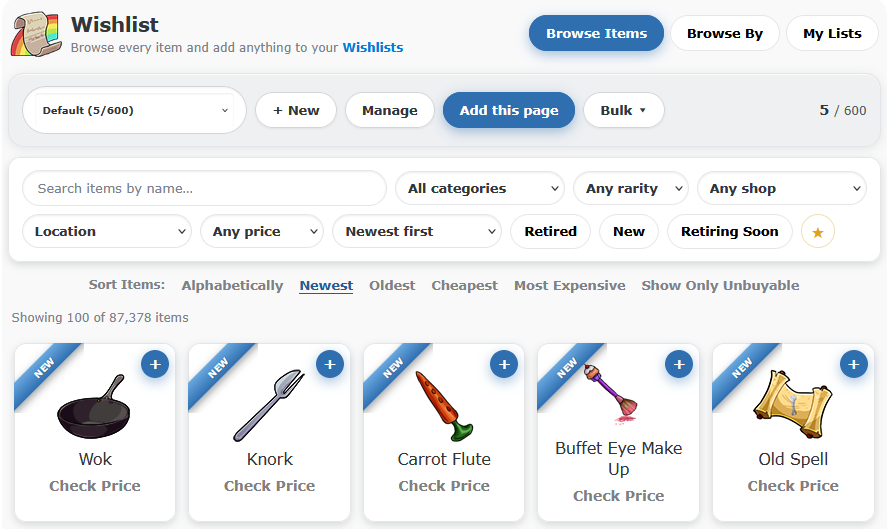
Start at Browse Items, making sure you choose the Wishlist you are working on and press the blue + on any item. It changes to a tick when the item is on that list.
Search, filter, sort and add items from one clean page.
Useful shortcuts: the toolbar can add the current page, add matching results until the list reaches its 600-item capacity, or remove the items currently shown from your active list.
2
Browse the old way
The old browsing views are back, rebuilt to be faster and tidier.
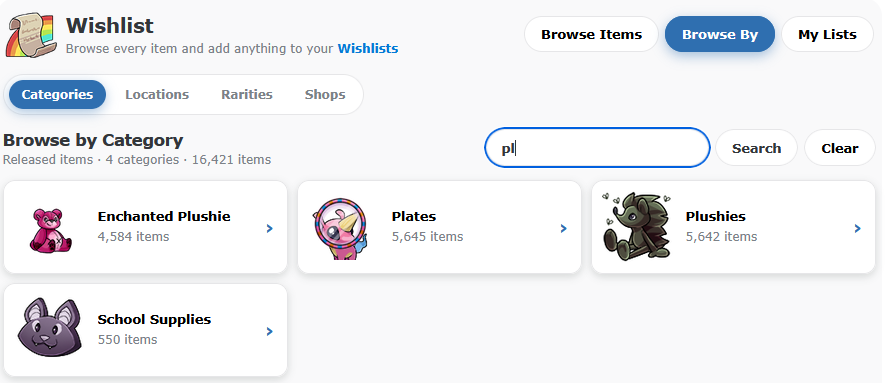
Choose Browse By to explore the item database by Category, Location, Rarity or Shop. Every group has a count and a clear visual card, with preview art where available, and you can search the whole directory instead of hunting through pages.
You can still browse the same as before but it's faster, prettier and you can now search
3
Filter items with Unnecessary Perfection
These new features make the wishlists so much more powerful!
Whatever items are displayed on the page can be bulk added or removed from any of your lists in one click. What makes this a really powerful feature is that you can filter the results down to only show what you actually want/need and then bulk add (or remove) what is displayed from your list.
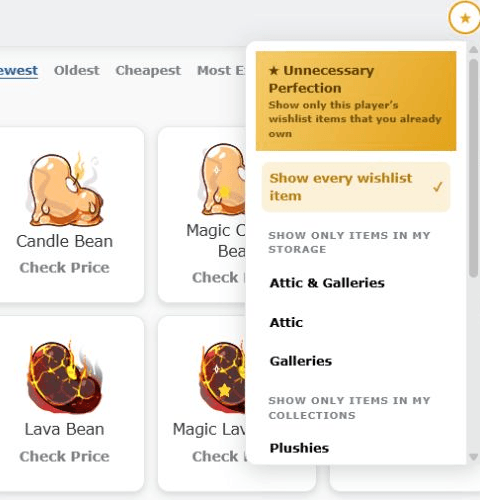
Players who have completed the Unnecessary Perfection Treasure Map can open the yellow star button and show only the items from that list that they already own.
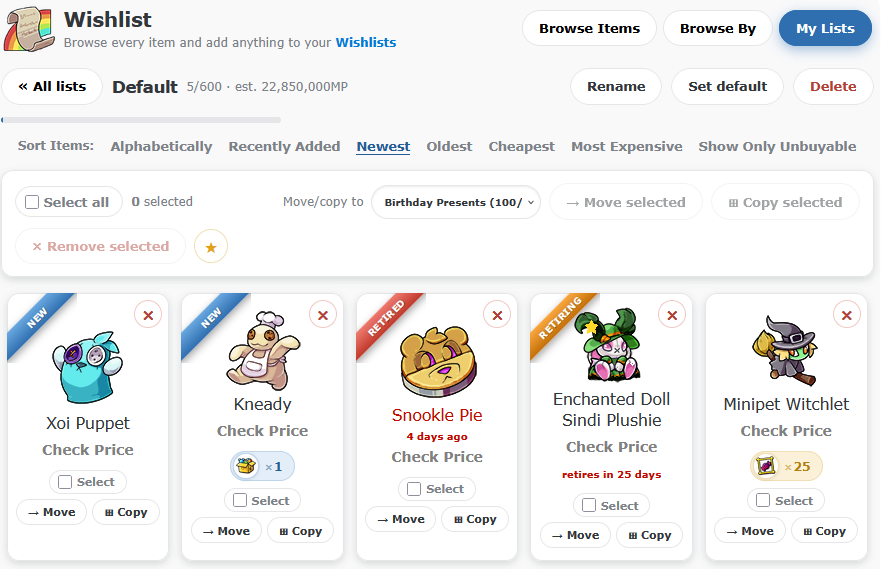
Match against your stored Attic and Galleries items, or item collections like Plushies, Plates, Photos, Glowing Eggs, Stamps, Trading Cards and Wardrobe. Your default pet's collection can also be used to only display what they are missing. Attic and Gallery quantities are also shown under each item!
The same yellow star works in reverse on Browse Items and your own lists, where it can hide items you already own.
Example Usage: A new event has started and you are viewing all of its prizes on the wishlist. You can create a new list, bulk add them all to it and then hide any of the prizes that you already have in storage and/or your collections to see what you're missing!
The yellow star opens the ownership matching tools.
4
Sort by what matters
The familiar options are still here, with several useful additions.
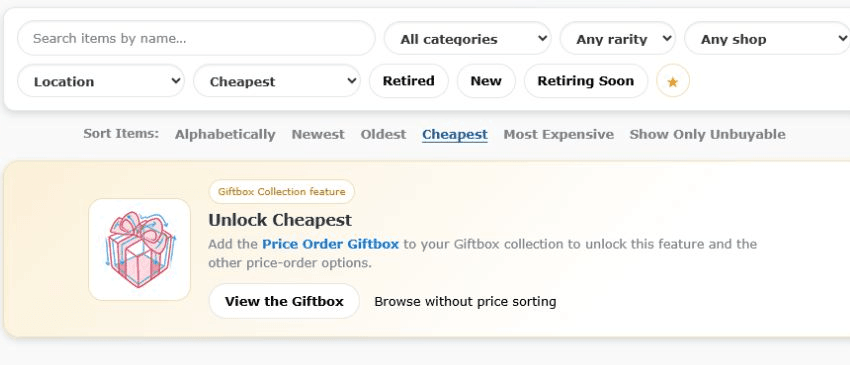
On Browse Items, you can also sort alphabetically, by cheapest or most expensive, and by best Wanted Ad price. Use the Retired, New and Retiring Soon buttons when you only want a particular type of item. Inside a Wishlist, the sort links are Alphabetically, Recently Added, Newest, Oldest, Cheapest, Most Expensive and Show Only Unbuyable.
Recently Added is separate from Newest, so both ways of ordering a list are now available.
All sort by price options remain a Price Order Giftbox feature. Now you can use it everywhere to sort any list by the Cheapest, Most Expensive, Unbuyable only and by the Best Wanted Ad Price
5
Make more lists
Keep different collections, goals and gift ideas properly separated.
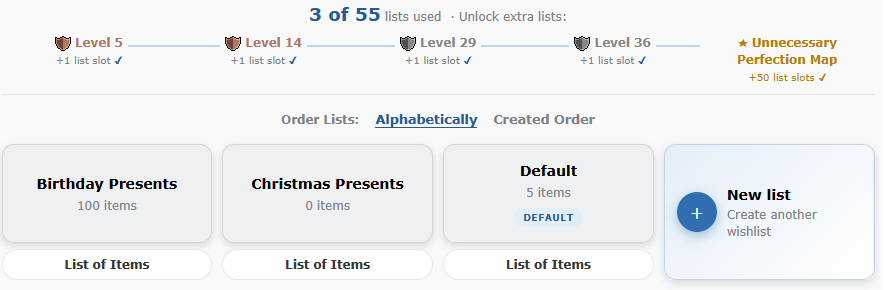
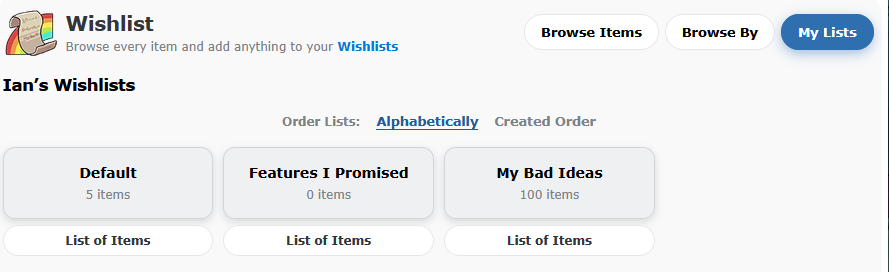
Every player starts with a Wishlist. Extra list slots unlock after completing Levels 5, 14, 29 and 36, and completing the Unnecessary Perfection Map unlocks another 50 list slots. That is up to 55 Wishlists, with a 600-item capacity for each list
Lists are alphabetical by default, with Created Order available whenever you prefer it.
Rename a list, make it your default or delete it from its own page.
Select several items and move, copy or remove them together.
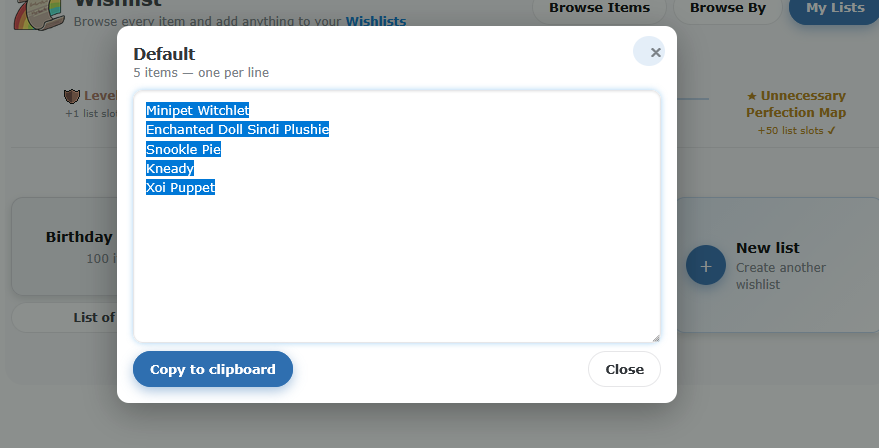
Use List of Items to create a clean text list and copy it to your clipboard.
6
Visit another player's Wishlists
This is where the new Wishlist becomes especially useful for trading and gifting.
Open a player's Wishlist from their profile to see each of their lists and item counts. Choose a list and you will have the same familiar sort links. You can easily add/remove their items to your lists. You can also compare their lists to items you have in storage or collections
Easier to scan, sort and compare!
We know that a lot of you - myself included - like to use an old fashioned list so we've also added the List of Items button under each list that you can click to get an easy-to-copy text list of each item to paste into your Blog
Click the 'List of Items' button for a text list of any wishlist too!
Can't believe I've been here since month 2 or 3 ish... Thank you for all the hard work over the years and for the continued support! Looking forward to all the new goodies and fresh paint on old stuff :love:
I just wanna say thank you so much for all your hard work. there are several old sites not even doing a fraction of the work in modernizing their codes and they have several teams of people. so thank you again.






































 ~Feeding Karmelli~














 Account Upgrades
 Account Upgrades Shop
 Calendar
 Capsule Machine
 Forums
 Giftbox Shop
 Lottery
 Monthly Checklist
 Raffle
 Retirement Planning
 Sewer Fairy
 Wishlist